
How to Integrate Julia Code Within a Python Program
Find out how to combine Julia and Python with a practical example.
This post was written by Steven Whitaker.
Ever wish your Python code could run faster
on heavy calculations or simulations?
With juliacall,
you can call Julia straight from Python
and instantly access blazing-fast performance
and powerful scientific libraries,
all without rewriting your existing code.
Supercharge your Python workflows today and
elevate your data science and engineering projects
to new heights!
In this Julia for Devs post,
learn step-by-step how to install and
utilize juliacall,
enabling you to
boost critical code performance
effortlessly,
without rewriting your entire project.
Unlock the powerful combination of
Python’s vast ecosystem
and Julia’s speed,
making it easy to experiment,
optimize,
or gradually migrate key components.
Let’s dig in!
Installing juliacall
Installation is a breeze, all you need is
pip install juliacall
You can test your installation by running the following in Python:
from juliacall import Main as jl
The first time this runs, it will install the Julia packages needed for communicating between Julia and Python.
Then you can try it out:
import numpy as np
A = np.array(jl.rand(5, 3))
x = np.array(jl.randn(3))
y = A @ x
Great, Julia-Python interoperability works for this small example! Now let’s see how we can extend this to a larger example.
Calling Custom Code
In practice, we might have written some custom code in Julia that we want to integrate into our Python workflow. Let’s walk through the process of this integration.
Julia Code
Typically, the Julia code will be organized into a package, including its own package environment and dependencies.
We’ll work with an example that runs a simulation using OrdinaryDiffEq.jl and StaticArrays.jl. The example package has the following directory structure:
JuliaExample
├── Project.toml
└── src
    └── JuliaExample.jl
The Project.toml has the following content:
name = "JuliaExample"
uuid = "0b6476de-1cea-499f-93be-749bc74a9c07"
authors = ["Author Name <address@email.com>"]
version = "0.1.0"

[deps]
OrdinaryDiffEq = "1dea7af3-3e70-54e6-95c3-0bf5283fa5ed"
StaticArrays = "90137ffa-7385-5640-81b9-e52037218182"
And JuliaExample.jl contains:
module JuliaExample

using OrdinaryDiffEq: ODEProblem, Tsit5, solve
using StaticArrays: SVector

struct Params
    α::Float64
    β::Float64
    γ::Float64
end

function f(u, p, t)

    (; α, β, γ) = p

    dx = α * (u[2] - u[1])
    dy = u[1] (β - u[3]) - u[2]
    dz = u[1] * u[2] - γ * u[3]

    return SVector(dx, dy, dz)

end

function simulate(u0, t_start, t_end, α, β, γ)

    u0 = SVector{3, Float64}(u0)
    tspan = (t_start, t_end)
    p = Params(α, β, γ)
    prob = ODEProblem{false}(f, u0, tspan, p)
    sol = solve(prob, Tsit5())

end

end
Python Code
We have our custom Julia code, so now let’s see what our Python workflow looks like that calls out to Julia.
We’ll have our code organized in the following directory structure:
python_example
├── pyproject.toml
├── scripts
│   └── run.py
└── src
    └── python_example
        ├── __init__.py
        └── analysis.py
The main functionality of our Python code
is in analysis.py:
from juliacall import Main as jl
jl.seval("using JuliaExample: simulate")

import numpy as np
import matplotlib.pyplot as plt

def simulate(*args):
    result = jl.simulate(*args)
    t = np.array(result.t)
    sol = np.array([np.array(u) for u in result.u])
    return t, sol

def plot_results(t, sol):
    plt.figure(figsize=(10, 6))
    labels = ["x", "y", "z"]
    colors = ["tab:blue", "tab:orange", "tab:green"]

    for i in range(3):
        plt.plot(t, sol[:, i], label=labels[i], color=colors[i])

    plt.xlabel("Time [s]")
    plt.ylabel("Value")
    plt.title("Solution Components Over Time")
    plt.legend()
    plt.grid(True)
    plt.tight_layout()
    plt.show()
This code provides two functions: one for calling out to Julia to run a simulation, and another for plotting the simulation results.
Let’s break down some of this code to see how Julia is incorporated:
-
We saw this earlier; this is how to loadfrom juliacall import Main as jljuliacall. -
Here, we load our Julia package, specifically bringing the functionjl.seval("using JuliaExample: simulate")simulateinto scope. - The Python function
simulatecalls the Juliasimulate, passing along all its inputs:
The Python function then does some processing to convert the Julia results into something more easily utilized by further Python processing.result = jl.simulate(*args)
This functionality is exercised
in the run.py script:
from python_example import simulate, plot_results
import numpy as np

u0 = np.array([1, 0, 0])
t_start = 0
t_end = 100
alpha = 10
beta = 28
gamma = 8/3
t, sol = simulate(u0, t_start, t_end, alpha, beta, gamma)
plot_results(t, sol)
Finally,
for completeness,
here’s __init__.py:
from .analysis import simulate, plot_results
Finding Julia
We have all our code set up,
so now we need Python
to be able to find the Julia code
so we can call out to it.
In other words,
we need the Julia package environment
used by juliacall
to have JuliaExample as a dependency.
We can accomplish this
by creating a juliapkg.json file
in our Python project directory
(i.e., python_example/juliapkg.json).
The file should contain the following JSON:
{
    "packages": {
        "JuliaExample": {
            "uuid": "0b6476de-1cea-499f-93be-749bc74a9c07",
            "path": "path/to/JuliaExample",
            "dev": true
        }
    }
}
Note that the uuid here
needs to match the uuid
in JuliaExample/Project.toml.
And the "path" and "dev": true fields are necessary
because our Julia package exists locally on our machine;
it is not a registered Julia package.
See the juliacall docs
for more information about juliapkg.json.
Putting It Together
Now we have all the components we need:
Python code to run,
Julia code to call out to,
and juliapkg.json to tell juliacall
where to find our Julia code.
So, what happens when we run run.py?
The first time it is run,
juliacall will set up the Julia package environment,
installing the dependencies of JuliaExample.
Then, the script proceeds to run the simulation
(calling out to Julia to do so)
and plot the results:
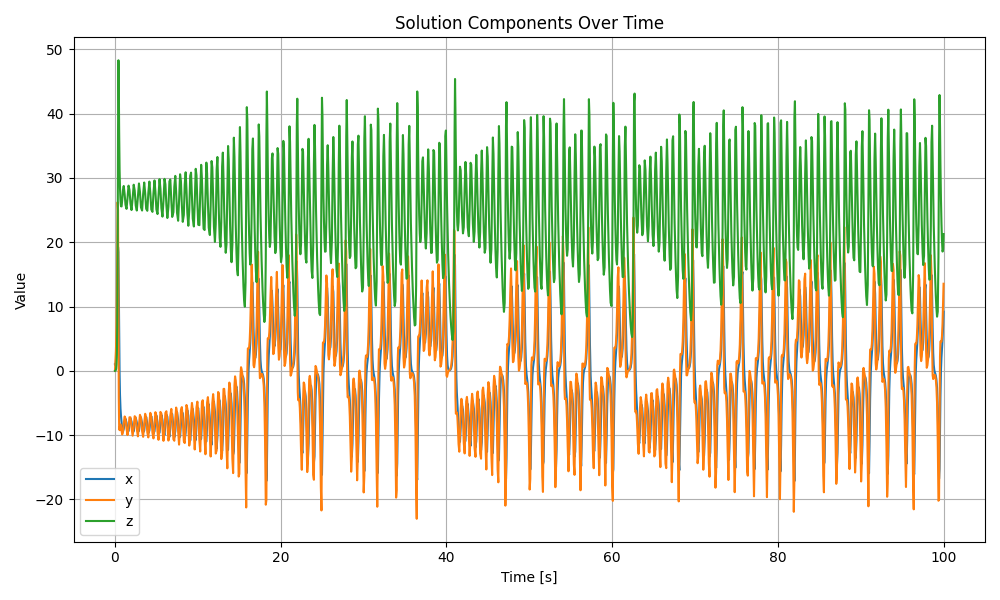
Awesome, we now have a working example showing how to call out to Julia from a Python project!
Summary
In this post,
we saw how to install and use juliacall
to call out to Julia from within Python.
We looked at a trivial example
as well as a more realistic example
of integrating custom Julia code
into a Python project.
What custom Julia code do you want to integrate into your Python projects? Contact us, and we can make it happen!
Additional Links
- PythonCall.jl
- One cool thing about
juliacallis it is maintained in the same GitHub repo asPythonCall, which is the recommended way to call Python code from Julia.
- One cool thing about
- GLCS Modeling & Simulation
- Connect with us for Julia Modeling & Simulation consulting.