
Simplifying Julia Package Integration with Extensions
Master creating a conditional bridge between two packages in Julia.
This post was written by Steven Whitaker.
The Julia programming language is a high-level language that is known, at least in part, for its outstanding composability. Much of Julia’s composability stems from its multiple dispatch, which allows functions written in one package to work with objects from another package without either package needing to depend on or even know about the other. (See another blog post for more details.)
Sometimes, however, it is useful for a package to be able to extend its functions to provide additional functionality when given an object of a specific type from another package. One way to do so is to add the other package as an explicit dependency so that its type is available for the first package to use to define a specific method for it.
But what if the package can function just fine without the additional functionality? What if the extra functionality isn’t integral to what the package does and only applies if the user wants to work with objects of that specific type? In this case, it doesn’t make much sense to make the other package a direct dependency, because then every user pays the price of extra package load time for functionality that only some users actually want.
The solution is package extensions. A package extension is code that gets loaded conditionally, depending on what other packages the user has explicitly loaded. In other words, when a user loads both the package and the dependency the extension depends on, the extension gets loaded automatically. This way, users who want to use the package can do so without the added dependency, while users who want the extra functionality can load the dependency themselves.
In this post, we will learn about some package extensions that exist in the Julia package ecosystem. We will also learn how to write a package extension and how to load the extension.
This post assumes you are familiar with the structure of a Julia package. If you need to learn more, check out our post on creating Julia packages.
Package Extensions in the Wild
- ForwardDiff.jl has an extension for StaticArrays.jl, enabling forward-mode automatic differentiation with the performance benefits of StaticArrays.
- Lux.jl has an extension for Flux.jl that adds functionality for converting deep learning models defined in Flux to Lux.
- Some other packages with extensions
(just look in the
extfolder of these git repos):- ModelingToolkit.jl
- JET.jl
- Distributions.jl
- ChainRulesCore.jl
- LinearSolve.jl
- PackageExtensionsExample.jl
- Okay, this one isn’t really a package extension in the wild, but it could be a good resource for learning how they work.
Writing a Package Extension
To create a package extension,
one needs to create a module
that adds method definitions
to functions from one of the packages
(either the package being extended
or the package that triggers loading the extension)
that dispatch on types from the other package.
This module will live in the ext directory
of the package being extended.
Additionally,
the extended package’s Project.toml
needs to be updated
to inform the package manager
of the existence of the extension
and when to load it.
Let’s look at a concrete example.
Example Package to Extend
This example will build on a custom package called Averages.jl that we discussed in our blog post on testing Julia packages. The package code is as follows:
module Averages

using Statistics: mean

export compute_average

compute_average(x) = (check_real(x); mean(x))

function compute_average(a, b...)

    check_real(a)

    N = length(a)
    for (i, x) in enumerate(b)
        check_real(x)
        check_length(i + 1, x, N)
    end

    T = float(promote_type(eltype(a), eltype.(b)...))
    average = Vector{T}(undef, N)
    average .= a
    for x in b
        average .+= x
    end
    average ./= length(b) + 1

    return a isa Real ? average[1] : average

end

function check_real(x)

    T = eltype(x)
    T <: Real || throw(ArgumentError("only real numbers are supported; unsupported type $T"))

end

function check_length(i, x, expected)

    N = length(x)
    N == expected || throw(DimensionMismatch("the length of input $i does not match the length of the first input: $N != $expected"))

end

end
Creating the Extension
For this example,
we will create an extension
that implements additional functionality for DataFrames.
These are the tasks we need to do
to implement the extension:
-
Create the extension at
Averages/ext/AveragesDataFramesExt.jl. Note that this follows the naming convention for extensions:<PackageName><NameOfPackageThatTriggersExtension>Ext. Inside this file, we create a module calledAveragesDataFramesExt(same name as the file) and put the code we want to be included when Averages.jl and DataFrames.jl are loaded together:module AveragesDataFramesExt import Averages using Averages: compute_average using DataFrames: All, DataFrame, combine function Averages.compute_average(df::DataFrame) @info "Running code in AveragesDataFramesExt!" df_avg = combine(df, All() .=> compute_average) return df_avg end end -
Add
[weakdeps]and[extensions]sections to theProject.tomlof Averages.jl. (See our previous blog post for the originalProject.toml.) In[weakdeps], specify DataFrames.jl and its UUID, and, in[extensions], specify our extension (AveragesDataFramesExt) and its dependency (DataFrames.jl). The UUID of DataFrames.jl can be found in DataFrames.jl’sProject.toml.Here’s the updated
Project.tomlfor Averages.jl:name = "Averages" uuid = "1fc6e63b-fe0f-463a-8652-42f2a29b8cc6" version = "0.1.0" [deps] Statistics = "10745b16-79ce-11e8-11f9-7d13ad32a3b2" [weakdeps] DataFrames = "a93c6f00-e57d-5684-b7b6-d8193f3e46c0" [extensions] AveragesDataFramesExt = "DataFrames" [extras] Test = "8dfed614-e22c-5e08-85e1-65c5234f0b40" [targets] test = ["Test"](Note that, just as compatible versions of the
[deps]packages can be specified in a[compat]section, so too can the compatible versions of the[weakdeps]packages be specified.)
Using the Extension
First, let’s see what happens if we try this without the extension:
julia> compute_average(DataFrame(a = [1, 2], b = [3.0, 4.0]))
ERROR: ArgumentError: only real numbers are supported; unsupported type Any
Stacktrace:
 [1] check_real(x::DataFrame)
   @ Averages /path/to/Averages/src/Averages.jl:34
 [2] compute_average(x::DataFrame)
   @ Averages /path/to/Averages/src/Averages.jl:7
 [3] top-level scope
   @ REPL[5]:1
So, now let’s see if the extension allows this function call to work.
To use the extension,
install and load Averages.jl and DataFrames.jl
(for Averages.jl, use the dev command,
i.e., pkg> dev /path/to/Averages)
and then call compute_average:
julia> using Averages, DataFrames

julia> compute_average(DataFrame(a = [1, 2], b = [3.0, 4.0]))
[ Info: Running code in AveragesDataFramesExt!
1×2 DataFrame
 Row │ a_compute_average  b_compute_average
     │ Float64            Float64
─────┼──────────────────────────────────────
   1 │               1.5                3.5
Nice, it works! And with that, we have an example package extension that illustrates how to implement your own.
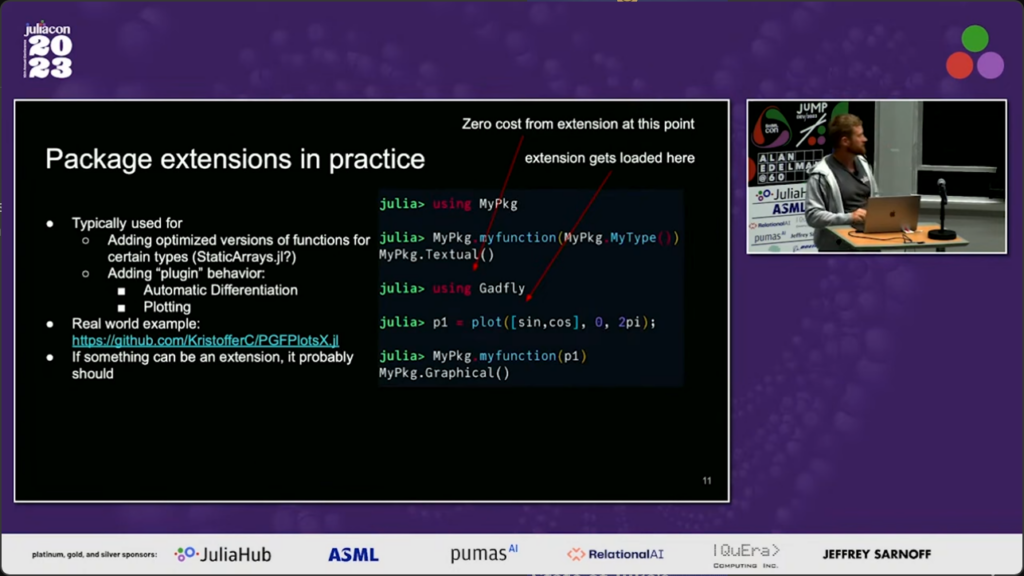
And remember, a user of Averages.jl will only incur the cost of loading AveragesDataFramesExt if they load DataFrames.jl. For more details, see the slide annotations in this screenshot from JuliaCon 2023:
(See also the full talk on package extensions for even more details.)
Note: Where Should an Extension Live?
By the way, if you’re wondering why we put the extension in Averages.jl instead of DataFrames.jl, the answer is that it doesn’t really matter because the user experience will be the same regardless. If you still want some rules to follow, I’m not aware of any Julia best-practices in this regard, but here are some rules that make sense to me:
- If one of the two packages in question defines an interface, the extension should go in the package that implements the interface.
- Otherwise,
put the extension in the package
that owns the functions
that are being extended.
In our example,
we extended the
compute_averagefunction. Since this function is defined in Averages.jl, we put the extension in Averages.jl. - An exception to the previous rule
is if getting the new functionality right
requires a good understanding
of the internals of the new data type
that’s being dispatched on,
in which case the extension
should belong in the package
that defines the type.
For example,
if
compute_averagewas super complicated for some reason when working withDataFrames, it would make sense for those with the needed expertise (i.e., the developers of DataFrames.jl) to own and maintain the extension.
Summary
In this post, we listed some real Julia packages that have their own package extensions. We also demonstrated creating our own extension for an example package and showed how to use the extension’s code.
What package extensions have you found useful? Let us know in the comments below!
Additional Links
- Julia Package Extension Docs
- Official Julia documentation on package extensions.
- JuliaCon 2023 Talk Introducing Package Extensions
- Talk by Kristoffer Carlsson in which package extensions are introduced.