

Delving into Open Source Packages for Julia
Learn to use Julia packages with these helpful tools.

Julia is a relatively new, free, and open-source programming language. It has a syntax similar to that of other popular programming languages such as MATLAB® and Python, but it boasts being able to achieve C-like speeds.
Julia comes with a lot of functionality built-in. However, functionality that isn't already built-in needs to be created from base Julia. Fortunately, Julia provides a simple, yet powerful, mechanism for reusing and sharing code: packages.
Thanks to packages, we don't have to write the code to do many common tasks ourselves. (Imagine having to write a plotting function from scratch...)
We learned in a previous post about the Pkg REPL prompt and how it can be used to install packages.
To install a package, you have to know it exists. And when using a package for the first time, how do you know where to begin? The purpose of this post is to address this question.
In this post, we will learn how to find useful packages and demonstrate how to discover a package's functionality and learn how to use it.
This post assumes you already have a basic understanding of variables and functions in Julia. You should also understand the difference between functions and methods. If you haven't yet, check out our earlier post on variables and functions as well as our post on multiple dispatch, which explains the difference between functions and methods.
Package Discovery
The first step to learning a Julia package is actually finding the package.
Essentially all Julia packages are registered, or made available for download via the Pkg REPL prompt, in Julia's General registry. Therefore, one could look through the registry to get a sense of the different packages available.
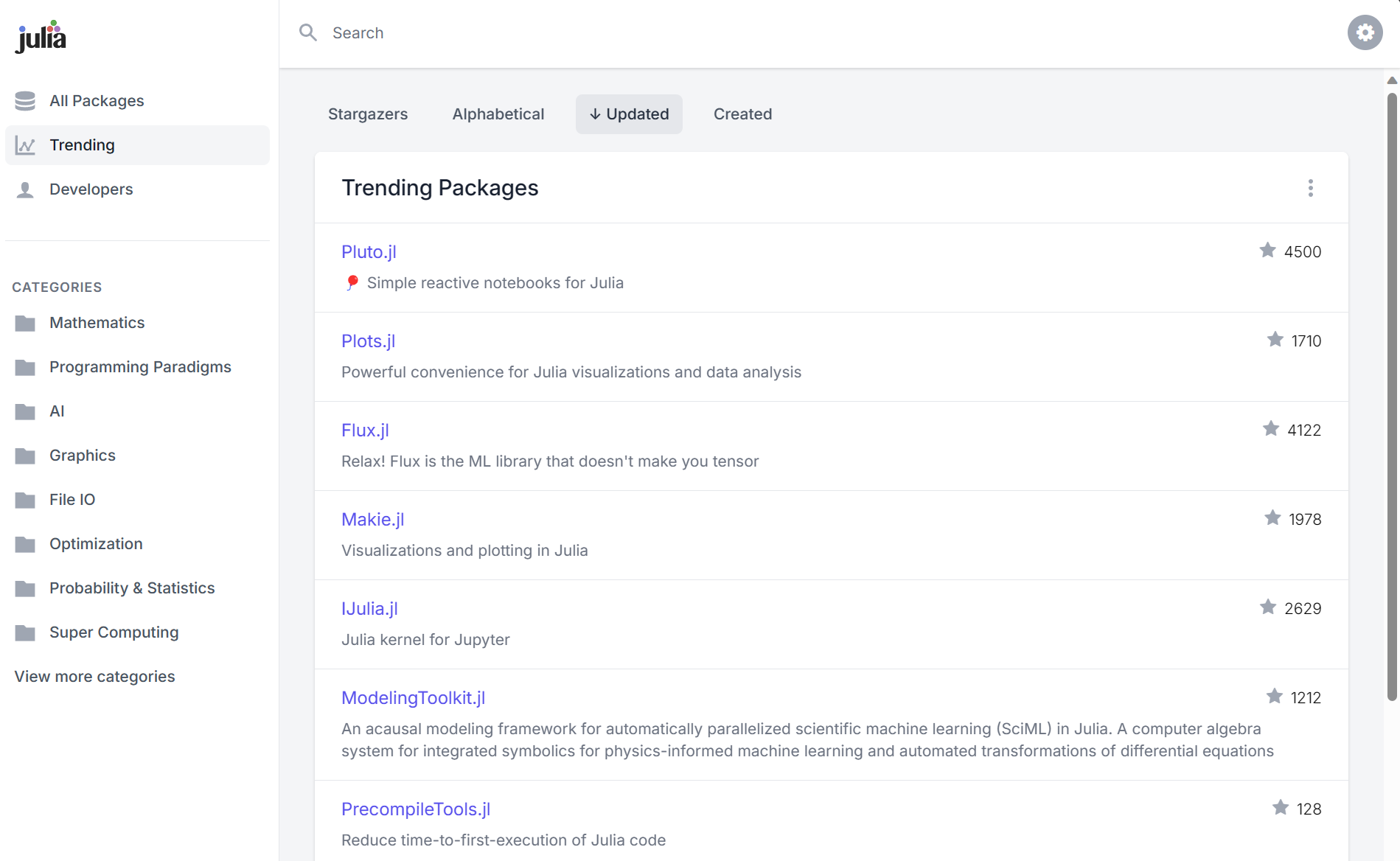
For a more powerful way to explore Julia packages, check out juliapackages.com. This website gathers information from GitHub to allow sorting by popularity (as measured by the number of GitHub stars) and when packages were last updated (which can help give a sense of how actively maintained or updated packages are). You can also explore packages by category.
Finally, another way to discover packages is to visit Julia Discourse. You can look at package announcements to see what packages are being created. You can also peruse the specific domains tags to see what packages people are talking about and get a feel for what packages people use for different applications.
Now that we have some tools for discovering packages, let's discuss how to learn how to use a package.
Learning Package Functionality
Look at Documentation
The first step to finding out what a package has to offer is to look at the package's documentation.

Most packages will have at least a README that will list package functionality and provide some examples of how to use the package. See Interpolation.jl's README as an example.
Often, more established packages will also have dedicated documentation (that typically is linked in the README). Documentation typically includes more in-depth examples of how to perform specific tasks using the package. For example, DataFrames.jl includes a "First Steps" page in its documentation.
Another common feature of package documentation is a list of functions, types, constants, and other symbols defined by the package. See, for example, ForwardDiff.jl's differentiation API. This list can be useful for discovering all possible package functionality, especially when the examples elsewhere in the documentation cover only a small portion of package functionality.
Explore in the REPL
Besides looking at online documentation, the REPL can also be useful for learning how to use a package.
After a package is loaded, an exhaustive list of symbols defined in a package can be obtained via tab completion:
julia> using Debugger

julia> Debugger.<tab><tab>
@bp                             @breakpoint                     @enter
@make_frame                     @run                            DebugCompletionProvider
DebuggerState                   HIGHLIGHT_24_BIT                HIGHLIGHT_256_COLORS
HIGHLIGHT_OFF                   HIGHLIGHT_SYSTEM_COLORS         HighlightOption
LimitIO                         LimitIOException                LineNumbers
MAX_BYTES_REPR                  NUM_SOURCE_LINES_UP_DOWN        RESET
RunDebugger                     SEARCH_PATH                     WATCH_LIST
__init__                        _current_theme                  _eval_code
_iscall                         _isdotcall                      _make_frame
_preprocess_enter               _print_full_path                _syntax_highlighting
active_frame                    add_breakpoint!                 add_watch_entry!
append_any                      assert_allow_step               body_for_method
break_off                       break_on                        break_on_error
breakpoint                      breakpoint_char                 breakpoint_linenumbers
check_breakpoint_index          clear_watch_list!               completions
compute_source_offsets          disable_breakpoint!             enable_breakpoint!
eval                            execute_command                 get_function_in_module_or_Main
highlight_code                  include                         interpret_variable
invalid_command                 julia_prompt                    locdesc
locinfo                         maybe_quote                     parse_as_much_as_possible
pattern_match_apply_call        pattern_match_kw_call           print_codeinfo
print_frame                     print_lines                     print_locals
print_next_expr                 print_sourcecode                print_status
print_var                       promptname                      remove_breakpoint!
repr_limited                    set_highlight                   set_theme
show_breakpoint                 show_breakpoints                show_watch_list
stacklength                     suppressed                      toggle_breakpoint!
toggle_lowered                  toggle_mode                     write_prompt
As discussed in our post about the Julia REPL, the help prompt can be used to display documentation for individual functions and types:
# Press ? to enter help mode
help?> filter
search: filter filter! fieldtype fieldtypes

  filter(f, a)


  Return a copy of collection a, removing elements for which f is false.
  The function f is passed one argument.
If you want to find out what methods exist for a given function, you can use tab completion:
julia> print(<tab>
print(io::IO, ex::Union{Core.GotoNode, Core.SSAValue, Expr, GlobalRef, Core.GotoIfNot, LineNumberNode, Core.PhiCNode, Core.PhiNode, QuoteNode, Core.ReturnNode, Core.Slot, Core.UpsilonNode}) @ Base show.jl:1384
print(io::IO, s::Union{SubString{String}, String}) @ Base strings/io.jl:246
print(io::IO, x::Union{Float16, Float32}) @ Base.Ryu ryu/Ryu.jl:128
print(io::IO, n::Unsigned) @ Base show.jl:1144
⋮
You can also use the methods function:
julia> methods(print)
# 35 methods for generic function "print" from Base:
  [1] print(io::IO, ex::Union{Core.GotoNode, Core.SSAValue, Expr, GlobalRef, Core.GotoIfNot, LineNumberNode, Core.PhiCNode, Core.PhiNode, QuoteNode, Core.ReturnNode, Core.Slot, Core.UpsilonNode})
     @ show.jl:1384
  [2] print(io::IO, s::Union{SubString{String}, String})
     @ strings/io.jl:246
  [3] print(io::IO, x::Union{Float16, Float32})
     @ Base.Ryu ryu/Ryu.jl:128
  [4] print(io::IO, n::Unsigned)
     @ show.jl:1144
  ⋮
The methods function
also allows filtering
on input types
and on the module
in which the methods are defined.
For example,
to get a list of methods of print
that take two arguments,
the second of which is an AbstractChar:
julia> methods(print, (Any, AbstractChar))
# 5 methods for generic function "print" from Base:
 [1] print(io::IO, c::Char)
     @ char.jl:252
 [2] print(io::IO, c::AbstractChar)
     @ char.jl:253
 [3] print(io::IO, x)
     @ strings/io.jl:32
 [4] print(io::IO, xs...)
     @ strings/io.jl:42
 [5] print(xs...)
     @ coreio.jl:3
(See also the related methodswith function.)
And to get methods of print
defined in the Dates package:
julia> using Dates

julia> methods(print, Dates)
# 4 methods for generic function "print" from Base:
 [1] print(io::IO, x::Period)
     @ Dates ~/programs/julia/julia-1.9.4/share/julia/stdlib/v1.9/Dates/src/periods.jl:48
 [2] print(io::IO, t::Time)
     @ Dates ~/programs/julia/julia-1.9.4/share/julia/stdlib/v1.9/Dates/src/io.jl:55
 [3] print(io::IO, dt::Date)
     @ Dates ~/programs/julia/julia-1.9.4/share/julia/stdlib/v1.9/Dates/src/io.jl:714
 [4] print(io::IO, dt::DateTime)
     @ Dates ~/programs/julia/julia-1.9.4/share/julia/stdlib/v1.9/Dates/src/io.jl:705
As another example,
suppose you have a DataFrame
and want to use the groupby function
but aren't sure what other arguments
groupby expects.
Tab completion (or the methods function) can help:
julia> using DataFrames

julia> x = DataFrame(a = 1:3, b = rand(3));

julia> gx = groupby(x, <tab>
groupby(df::AbstractDataFrame, cols; sort, skipmissing) @ DataFrames ~/.julia/packages/DataFrames/58MUJ/src/groupeddataframe/groupeddataframe.jl:218
After running a package's function,
you might want to learn more about
what the function returned.
The typeof function
returns the type of its input,
and fieldnames
returns a list of properties
that can be accessed:
julia> d = Dict("a" => 1, "b" => 2)
Dict{String, Int64} with 2 entries:
  "b" => 2
  "a" => 1

julia> x = collect(d)
2-element Vector{Pair{String, Int64}}:
 "b" => 2
 "a" => 1

julia> typeof(x)
Vector{Pair{String, Int64}} (alias for Array{Pair{String, Int64}, 1})

julia> fieldnames(typeof(x[1]))
(:first, :second)

julia> x[1].first
"b"
Tab completion can also be used to list properties:
julia> x[1].<tab><tab>
first   second
You can also see where in the type hierarchy
an object's type lies
with the supertype function:
julia> supertype(typeof(x))
DenseVector{Pair{String, Int64}} (alias for DenseArray{Pair{String, Int64}, 1})
Read Source Code
In addition to reading documentation and experimenting in the REPL, sometimes the best way to learn a package is to read the source code directly. While that may seem daunting at first, remember that Julia is a high-level language, making it somewhat easy to read (at least after getting used to it).
There are two main benefits of reading the source code:
- You get to see how the package creates and uses custom types and functions.
- Typically code is organized in a logical manner, so you get to see what symbols logically belong together. For example, a file that defines a type typically will also define constructors for that type and functions that operate on it.
If you see a function call
and want to know what method will be called,
the @which command in the REPL can help.
For example:
julia> using DataFrames

julia> df = DataFrame(a = 1:3);

julia> @which hcat(df, df)
hcat(df1::AbstractDataFrame, df2::AbstractDataFrame; makeunique, copycols)
     @ DataFrames ~/.julia/packages/DataFrames/58MUJ/src/abstractdataframe/abstractdataframe.jl:1608
Now we know the file and line number
where the hcat method
that acts on two DataFrames is defined,
and we can look at the source code
to learn more about what the method does.
If you don't have any objects to work with
but know the types of the inputs,
you can use the which method instead:
julia> which(hcat, (DataFrame, DataFrame))
hcat(df1::AbstractDataFrame, df2::AbstractDataFrame; makeunique, copycols)
     @ DataFrames ~/.julia/packages/DataFrames/58MUJ/src/abstractdataframe/abstractdataframe.jl:1608
Summary
That wraps up our discussion about how to find useful packages and how to discover and learn to use a package's functionality. We listed a few tools for finding packages and walked through some different methods for learning how to use a package, including looking at documentation, exploring in the REPL, and reading source code.
Do you have any tips or tricks for learning how to use packages in Julia? Let us know in the comments below!
Now that you have a better idea of how to learn Julia packages, move on to the next post to learn about parallel processing in Julia! Or, feel free to take a look at our other Julia tutorial posts.
Additional Links
- Julia for Analysts: Tips for Better Beginnings - Embrace the REPL (#3)
- Blog post with some more tips for getting help (see the heading "Getting help without leaving my workflow (no more googling)").
MATLAB is a registered trademark of The MathWorks, Inc.


